오늘 배운것
1. 파일 확장자 정리
| 파일 | 파일 형식 | 불러오기 |
| CSV 파일(.csv) | 데이터를 쉼표(,) 로 구분하여 저장하는 형식 | df = pd.read_csv('file.csv') |
| Excel 파일(.xls, .xlsx) | Excel 파일 - 표 형태로 데이터를 저장하는 방식 | df = pd.read_excel('file.xlsx') |
| JSON 파일(.json) | JavaScript Object Notation의 약자로 데이터를 간단히 저장하는 형식 | df = pd.read_json('file.json') |
| 텍스트 파일(.txt, . dat, 등) | 일반 텍스트로 된 데이터를 저장하는 파 | df = pd.read_csv('file.txt', delimiter='\t') |
2. 확장자에 따른 파일 저장하기
| CSV 파일(.csv) |
import pandas as pd
data = {
'Name': ['John', 'Emily', 'Michael'],
'Age': [30, 25, 35],
'City': ['New York', 'Los Angeles', 'Chicago']
}
df = pd.DataFrame(data)
excel_file_path = '/content/sample_data/data.csv'
df.to_csv(excel_file_path, index = False)
print("csv 파일이 생성되었습니다.")
|
| Excel 파일(.xls, .xlsx) |
import pandas as pd
data = {
'Name': ['John', 'Emily', 'Michael'],
'Age': [30, 25, 35],
'City': ['New York', 'Los Angeles', 'Chicago']
}
df = pd.DataFrame(data)
excel_file_path = '/content/sample_data/data.xlsx'
df.to_excel(excel_file_path, index = False)
# index = true 로 하면 인덱스가 형성됩니다. print("Excel 파일이 생성되었습니다.")
|
| JSON 파일(.json) |
import json
data = {
'Name': ['John', 'Emily', 'Michael'],
'Age': [30, 25, 35],
'City': ['New York', 'Los Angeles', 'Chicago']
}
json_file_path = '/content/sample_data/data.json'
# json 파일을 쓰기모드로 열어서 data를 거기에 덮어씌우게 됩니다.
with open(json_file_path, 'w') as jsonfile:
json.dump(data, jsonfile, indent=4)
print("JSON 파일이 생성되었습니다.")
|
| 텍스트 파일(.txt, . dat, 등) |
data = {
'Name': ['John', 'Emily', 'Michael'],
'Age': [30, 25, 35],
'City': ['New York', 'Los Angeles', 'Chicago']
}
text_file_path = '/content/sample_data/data.txt'
with open(text_file_path, 'w') as textfile:
for key, item in data.items():
textfile.write(str(key) + " : " + str(item) + '\n')
print("텍스트 파일이 생성되었습니다.")
|
3. 라이브러리 정리
| 라이브러리 명 | 라이브러리 기능 | 실행방법 예시 |
| pandas | 데이터 조작과 분석을 위한 라이브러리로, 데이터를 효과적으로 조작하고 분석할 수 있도록 도와줍니다. |
import pandas as pd
df = pd.read_excel(file_address)
print(df)
|
| numpy | 과학적 계산을 위한 핵심 라이브러리로, 다차원 배열과 행렬 연산을 지원합니다. |
import numpy as np
arr = np.array([1, 2, 3, 4, 5])
print(arr.mean())
|
| matplotlib | 데이터 시각화를 위한 라이브러리로, 다양한 그래프와 플롯을 생성할 수 있습니다. |
import matplotlib.pyplot as plt
plt.plot([1, 2, 3, 4], [1, 4, 9, 16])
plt.xlabel('X-axis')
plt.ylabel('Y-axis')
plt.show()
|
| seaborn | Matplotlib을 기반으로 한 통계용 데이터 시각화 라이브러리로, 보다 간편하고 아름다운 시각화를 제공합니다. |
import seaborn as sns
import pandas as pd
data_sample = pd.DataFrame({'x':[1, 2, 3, 4], 'y':[1, 4, 9, 16]})
sns.barplot(data=data_sample, x='x', y='y')
|
| scikit-learn | 머신 러닝 알고리즘을 사용할 수 있는 라이브러리로, 분류, 회귀, 군집화, 차원 축소 등 다양한 머신 러닝 기법을 제공합니다. |
from sklearn.datasets import load_iris
from sklearn.linear_model import LinearRegression
# Iris 데이터셋 불러오기
iris = load_iris()
# Iris 데이터셋에서 특정 범위의 데이터 슬라이싱하기
X_train = iris.data[:,:-1] # 데이터 값들 추출
print("학습 데이터:", X_train)
y_train = iris.data[:,-1:] # 정답값 추출
print("학습 데이터:", y_train)
model = LinearRegression()
model.fit(X_train, y_train)
|
| statsmodels | 통계 분석을 위한 라이브러리로, 회귀 분석, 시계열 분석, 비모수 통계 등 다양한 통계 기법을 제공합니다. |
import statsmodels.api as sm
model = sm.OLS(y_train, X_train)
result = model.fit()
print(result.summary())
|
| scipy | 과학기술 및 수학적인 연산을 위한 라이브러리로, 다양한 과학 및 공학 분야에서 활용됩니다. 선형대수, 최적화, 신호 처리, 통계 분석 등 다양한 기능을 제공합니다. |
import numpy as np
from scipy.integrate import quad
# 적분할 함수 정의
def integrand(x):
return np.exp(-x ** 2)
# 정적분 구간
a = 0
b = np.inf
# 적분 계산
result, error = quad(integrand, a, b)
print("결과:", result)
print("오차:", error)
|
| tensorflow | 딥러닝 및 기계 학습을 위한 오픈소스 라이브러리로, 구글에서 개발했습니다. 그래프 기반의 계산을 통해 수치 계산을 수행하며, 신경망을 구축하고 학습할 수 있습니다. |
import tensorflow as tf
input_size = 3
model = tf.keras.Sequential([
tf.keras.layers.Dense(10, activation='relu', input_shape=(input_size,)),
tf.keras.layers.Dense(1)
])
model.compile(optimizer='adam', loss='mse')
|
| pytorch | 딥러닝을 위한 오픈소스 라이브러리로, Facebook에서 개발했습니다. 동적 계산 그래프를 사용하여 신경망을 구축하고 학습할 수 있습니다. |
import torch
import torch.nn as nn
class Model(nn.Module):
def __init__(self):
super(Model, self).__init__()
self.fc1 = nn.Linear(input_size, hidden_size)
self.fc2 = nn.Linear(hidden_size, output_size)
def forward(self, x):
x = torch.relu(self.fc1(x))
x = self.fc2(x)
return x
|
3. 포메팅
문자와 변수를 함께 출력할 때 위와 같이 콤마(,)와 함께 써도 되지만 포맷팅(formatting)을 사용할 수 도 있음.
x = 10
print(f"변수 x의 값은 {x}입니다.")
이렇게 f를 앞에 써주고 변수의 위치에 중괄호{}를 사용하여 기입하면 됩니다.
x = 10
print("변수 x의 값은 {}입니다.".format(x))
다른방법입니다. 저는 1번이 훨씬 보기 좋네요.
4. 리스트 캄프리헨션
복잡한 코드를 한줄로 표현하게 해줍니다.
# 기본적인 구조
[표현식 for 항목 in iterable if 조건문]
예제)
|
# 예시: 1부터 10까지의 숫자를 제곱한 리스트 생성
squares = [x**2 for x in range(1, 11)]
print(squares) # 출력: [1, 4, 9, 16, 25, 36, 49, 64, 81, 100]
# 예시: 리스트에서 짝수만 선택하여 제곱한 리스트 생성
even_squares = [x**2 for x in range(1, 11) if x % 2 == 0]
print(even_squares) # 출력: [4, 16, 36, 64, 100]
# 예시: 문자열 리스트에서 각 문자열의 길이를 저장한 리스트 생성
words = ["apple", "banana", "grape", "orange"]
word_lengths = [len(word) for word in words]
print(word_lengths) # 출력: [5, 6, 5, 6]
# 예시: 리스트 컴프리헨션을 중첩하여 2차원 리스트 생성
matrix = [[i for i in range(1, 4)] for j in range(3)]
print(matrix) # 출력: [[1, 2, 3], [1, 2, 3], [1, 2, 3]]
|
5. lambda 사용하기
- 한줄로 함수를 표현하고 싶을때 사용합니다.
- 이름이 없기 때문에 임시로만 사용됩니다.
예시)
|
# 간단한 덧셈
add = lambda x, y: x + y
print(add(3, 5)) # 출력: 8
|
|
# 제곱
square = lambda x: x ** 2
print(square(4)) # 출력: 16
|
※ filter : 여러 개의 데이터로부터 조건을 충족하는 데이터만 추출할 때 사용하는 함수입니다.
|
filter(조건 함수, 반복 가능한 데이터)
|
예시)
|
numbers = [1, 2, 3, 4, 5, 6, 7, 8, 9, 10]
even_numbers = list(filter(lambda x: x % 2 == 0, numbers))
print(even_numbers) # 출력: [2, 4, 6, 8, 10]
|
※ map : 여러개의 값을 받아서 각각의 값에 함수를 적용한 결과를 반환한 내장함수 입니다.
|
map(함수, 반복 가능한 데이터)
|
예시)
|
numbers = [1, 2, 3, 4, 5]
squared_numbers = list(map(lambda x: x ** 2, numbers))
print(squared_numbers) # 출력: [1, 4, 9, 16, 25]
|
6. split 사용하기
공백이나 특정 구분자를 기준으로 문자열을 분할하여 리스트로 변환해줄 수 있습니다.
|
sentence = "Hello, how are you doing today?"
words = sentence.split()
print(words) # 출력: ['Hello,', 'how', 'are', 'you', 'doing', 'today?']
|
|
data = "apple,banana,grape,orange"
fruits = data.split(',')
print(fruits) # 출력: ['apple', 'banana', 'grape', 'orange']
|
※ Join : 리스트의 항목을 다시 결합하기
|
fruits = ['apple', 'banana', 'grape', 'orange']
data = ','.join(fruits)
print(data) # 출력: apple,banana,grape,orange
|
※ strip() : 문자열에서 공백을 제거합니다.
|
text = " Hello how are you "
cleaned_text = text.strip()
words = cleaned_text.split()
print(words) # 출력: ['Hello', 'how', 'are', 'you']
|
7. class 사용하기
기본구조
|
class ClassName:
def __init__(self, parameter1, parameter2):
self.attribute1 = parameter1
self.attribute2 = parameter2
def method1(self, parameter1, parameter2):
# 메서드 내용 작성
pass
|
예시)
|
class Person:
def __init__(self, name, age):
self.name = name
self.age = age
# 객체 생성
person1 = Person("Alice", 30)
person2 = Person("Bob", 25)
|
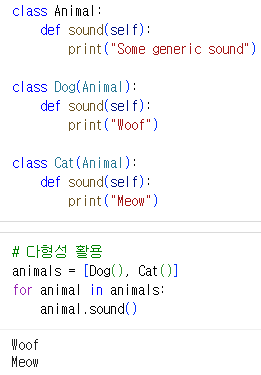
다형성 예시)
왜 클래스를 사용해야 하는가
1. 코드의 구조화
2. 재사용성
3. 상속과 다형성
4. 캡슐화
5. 객체 지향 설계