1. 결측치 탐색
|
missing_counts = titanic.isnull().sum()
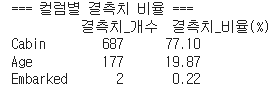
print("=== 컬럼별 결측치 비율 ===")
missing_ratios = (titanic.isnull().sum() / len(titanic) * 100).round(2)
missing_summary = pd.DataFrame({
'결측치_개수': missing_counts,
'결측치_비율(%)': missing_ratios
})
# 결측치가 있는 컬럼만 표시
missing_summary = missing_summary[missing_summary['결측치_개수'] > 0]
print(missing_summary.sort_values('결측치_비율(%)', ascending=False))
|
코드분석
| missing_counts = titanic.isnull().sum() |
- titanic 데이터 프레임의 결측치를 합해줍니다.

| missing_ratios = (titanic.isnull().sum() / len(titanic) * 100).round(2) |
- 결측치의 비율을 나타내 줍니다
len은 타이탄 데이터의 개수를 전부 세어주게 됩니다.

결과
2. 결측치 제거
만약 결측치 비율이 높다면 제거하는 만큼 데이터 손실이 되므로 주의해야 할 필요가 있습니다.
1) 결측치가 있는 행 삭제하기 : .dropna()
※ 사용시 주의사항
- 결측치 비율이 5% 미만일 때
- 결측치 패턴이 완전 무작위일 때
- 충분한 데이터가 남을 때
|
# 결측치가 있는 행 모두 삭제
titanic_dropped_all = titanic.dropna()
print(f"모든 결측치 행 삭제 후: {titanic_dropped_all.shape}")
print(f"삭제된 행: {len(titanic) - len(titanic_dropped_all)}개")
print(f"데이터 손실률: {(1 - len(titanic_dropped_all)/len(titanic))*100:.1f}%")
|
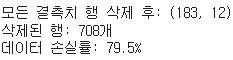
원래 891X12 의 데이터 량이 183 X12 의 데이터 량의로 변화하였습니다.
2) 결측치가 있는 열 삭제하기 : .dropna(axis=1)
※ 사용시 주의사항
- 결측치 비율이 50% 이상인 컬럼
- 분석에 중요하지 않은 컬럼
- 다른 변수로 대체 가능한 정보를 담은 컬럼
|
# 결측치가 있는 컬럼 삭제
print(f"\n=== 컬럼 삭제 방식 ===")
titanic_dropped_cols = titanic.dropna(axis=1)
print(f"결측치 컬럼 삭제 후: {titanic_dropped_cols.shape}")
print(f"삭제된 컬럼: {set(titanic.columns) - set(titanic_dropped_cols.columns)}")
|

2. 결측치 대체
📌 결측치 대체 전략 선택 가이드
- 평균값: 정규분포에 가까운 연속형 변수
- 중위수: 이상치가 많거나 치우친 분포
- 최빈값: 범주형 변수
- 특정값: 비즈니스 로직상 의미가 있는 값
- 예측값: 다른 변수들로 예측한 값 </aside>
|
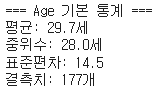
# Age의 기본 통계 확인
print("=== Age 기본 통계 ===")
age_stats = titanic['Age'].describe()
print(f"평균: {age_stats['mean']:.1f}세")
print(f"중위수: {age_stats['50%']:.1f}세")
print(f"표준편차: {age_stats['std']:.1f}")
print(f"결측치: {titanic['Age'].isnull().sum()}개")
|
1) 평균값으로 대체하기 : .fillna(mean)
평균값 대체의 장단점:
- ✅ 장점: 전체 평균에 영향을 주지 않음
- ❌ 단점: 분산이 줄어들어 변수의 다양성 감소
|
# 평균값으로 대체
age_mean = titanic_filled['Age'].mean()
titanic_filled['Age_mean_filled'] = titanic_filled['Age'].fillna(age_mean)
print(f"\n평균값({age_mean:.1f}세)으로 대체 완료")
print(f"대체 후 결측치: {titanic_filled['Age_mean_filled'].isnull().sum()}개")
|

차이를 위해 count() 를 해봤습니다.
결측치 177개가 mean값으로 대체된 것을 볼 수 있습니다.
2) 중위수로 대체하기 : .fillna(median)
평균과 값이 medain 수식어를 만들어주고 fillna를 통해 해당값을 채워주면 됩니다.
|
age_median = titanic_filled['Age'].median()
titanic_filled['Age_median_filled'] = titanic_filled['Age'].fillna(age_median)
|
언제 중위수를 사용할까?
중위수는 이상치의 영향을 덜 받으므로, 데이터에 극값이 많을 때 평균보다 안정적입니다.
3) 범주형 결측치의 확인 및 최빈값 대체
|
# Embarked 결측치 확인
print("=== Embarked 결측치 분석 ===")
embarked_counts = titanic['Embarked'].value_counts()
print(embarked_counts)
print(f"결측치: {titanic['Embarked'].isnull().sum()}개")
|

|
# 최빈값(가장 빈번한 값)으로 대체
embarked_mode = titanic['Embarked'].mode()[0] # mode()는 Series를 반환하므로 [0]
print(f"최빈값: {embarked_mode}")
titanic_filled['Embarked_filled'] = titanic_filled['Embarked'].fillna(embarked_mode)
print(f"최빈값({embarked_mode})으로 대체 완료")
print(f"대체 후 결측치: {titanic_filled['Embarked_filled'].isnull().sum()}개")
|

여기서 mode()는 최빈값이 몇번 나타나는지 Series 형식으로 알려줍니다.
[0] 은 중복 값일 경우 오류가 날수있기에 맨 위의 값을 나타내 주기위에 붙여줍니다.
참고로 titanic_filled['Embarked_filled'] = 이런식으로 써주면 원본데이터 손상없이 새로운 컬럼을 만들 수 있습니다.
3. 데이터 타입 변환 및 날짜 처리
날짜 형식 통일 : pd.to_datetime()
|
# 주문 날짜 변환
orders_df['order_date_clean'] = pd.to_datetime(orders_df['order_date'])
print("주문 날짜 변환:")
print(orders_df[['order_date', 'order_date_clean']].head(3))
|
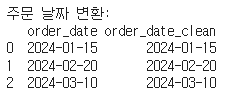
원래 string 형식이였던 것을 이렇게 날짜 형식으로 바꿀 수 있습니다.
1) 날짜 차이 계산
|
diff = orders_df['delivery_date'] - orders_df['order_date']
|
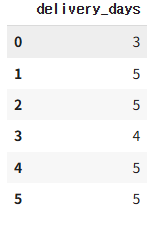
2) 날짜를 일단위로 얻기 : .dt.days
|
orders_df['delivery_days'] = (orders_df['delivery_date_clean'] - orders_df['order_date_clean']).dt.days
|
3) 날짜에서 다양한 정보 추출
|
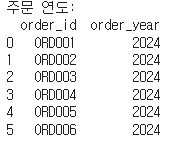
# 연도 추출
orders_df['order_year'] = orders_df['order_date_clean'].dt.year
print("주문 연도:")
print(orders_df[['order_id', 'order_year']])
|
|
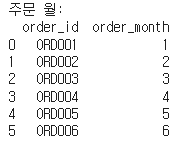
# 월 추출
orders_df['order_month'] = orders_df['order_date_clean'].dt.month
print("주문 월:")
print(orders_df[['order_id', 'order_month']])
|
|
# 요일명 추출 (더 직관적)
orders_df['order_weekday'] = orders_df['order_date_clean'].dt.day_name()
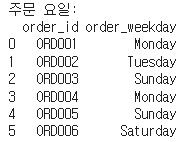
print("주문 요일:")
print(orders_df[['order_id', 'order_weekday']])
|