공정데이터를 활용한 실전 이상탐지 및 품질 이상 조기 예측_2회차
1. 공정 이상치 탐지 Zone Rule

① Rule 1 — 1 Point Beyond ±3σ
의미: 단일 포인트가 ±3σ 바깥이면 공정 이상
② Rule 2 — 9 Points in a Row on Same Side of Mean
조건: 9개 연속된 점이 평균의 같은 방향(위/아래) 에 위치하면 공정 이상
③ Rule 3 — 6 Points in a Row Increasing or Decreasing
조건: 6개 연속 증가 or 감소 → 추세 존재 (단순 노이즈 아님)
④ Rule 4 — 14 Points Alternating Up and Down
조건: 14개 연속 값이 오르락내리락 반복하면 공정 이상
⑤ Rule 5 — 2 out of 3 Points in Zone A (Same Side)
조건: 3개의 연속된 점 중 2개 이상이 Zone A에 있고 평균의 같은 쪽이면 위험
⑥ Rule 6 — 4 out of 5 Points in Zone B or Beyond (Same Side)
조건: 5개 중 4개가 Zone B 이상에 있고 평균의 같은 쪽이면 이상
⑦ Rule 7 — 15 Points in a Row in Zone C (Both Sides)
조건: 15개 연속 모두 Zone C 안에 있으면 → 너무 안정적 = 센서 오류 가능성
⑧ Rule 8 — 8 Points in a Row on Both Sides but None in Zone C
조건: 평균 기준으로 왔다갔다 하지만 Zone C엔 없음 → 경계 구간만 반복 = 불안정
2. Derivative(기울기, 변화량) 기반 탐지
- 개념: 값 자체가 아니라, 변화량에 이상 탐지 적용
- 활용 예시:
- 5초 내에 온도가 10도 이상 급등 → 이상
- 전류가 1초에 3A 이상 급격히 상승 ⇒ 도메인
기울기 예시코드
import numpy as np
import matplotlib.pyplot as plt

# 예시 시계열
data = np.concatenate([
    np.linspace(0, 1, 100),
    np.linspace(1, 10, 20),
    np.linspace(10, 11, 80)
])

# 변화량(기울기) 계산
gradient = np.diff(data)
threshold = 0.1  # 기울기 임계값

# 이상 지점 감지
anomalies = np.where(np.abs(gradient) > threshold)[0]

# 시각화
plt.figure(figsize=(10, 4))
plt.plot(data, label="Signal")
plt.scatter(anomalies, data[anomalies], color='red', label="Anomalies")
plt.title("Derivative-based Anomaly Detection")
plt.legend()
plt.grid(True)
plt.show()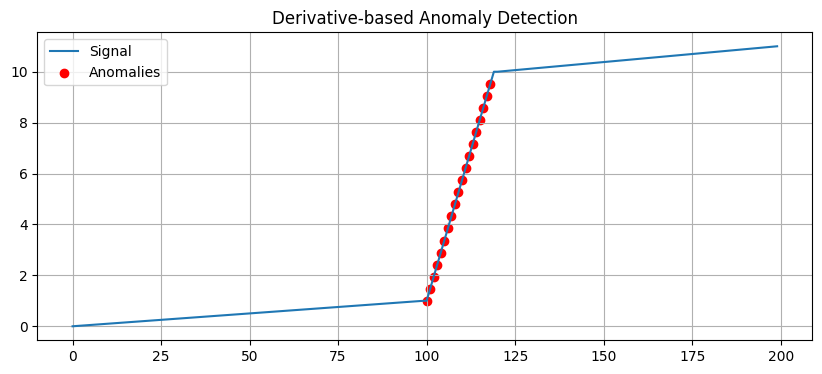
변화량 예시코드
import numpy as np
import matplotlib.pyplot as plt

np.random.seed(42)

normal_part1 = np.sin(np.linspace(0, 10, 100)) + np.random.normal(0, 0.1, 100)
anomaly_part = np.sin(np.linspace(10, 15, 30)) * 2 + 0.3 * np.linspace(0, 1, 30) + np.random.normal(0, 0.1, 30)
normal_part2 = np.sin(np.linspace(15, 25, 100)) + np.random.normal(0, 0.1, 100)
data = np.concatenate([normal_part1, anomaly_part, normal_part2])

# 변화량(1차 차분)
gradient = np.diff(data)
threshold = 0.3  # 이상 탐지 임계값

# 이상 지점 감지
anomalies = np.where(np.abs(gradient) > threshold)[0]

# 시각화
plt.figure(figsize=(12, 5))
plt.plot(data, label="Sensor signal")
plt.scatter(anomalies, data[anomalies], color='red', label="Anomalies")
plt.title("Realistic Sensor Signal with Derivative-based Anomaly Detection")
plt.xlabel("Time")
plt.ylabel("Sensor Value")
plt.grid(True)
plt.legend()
plt.tight_layout()
plt.show()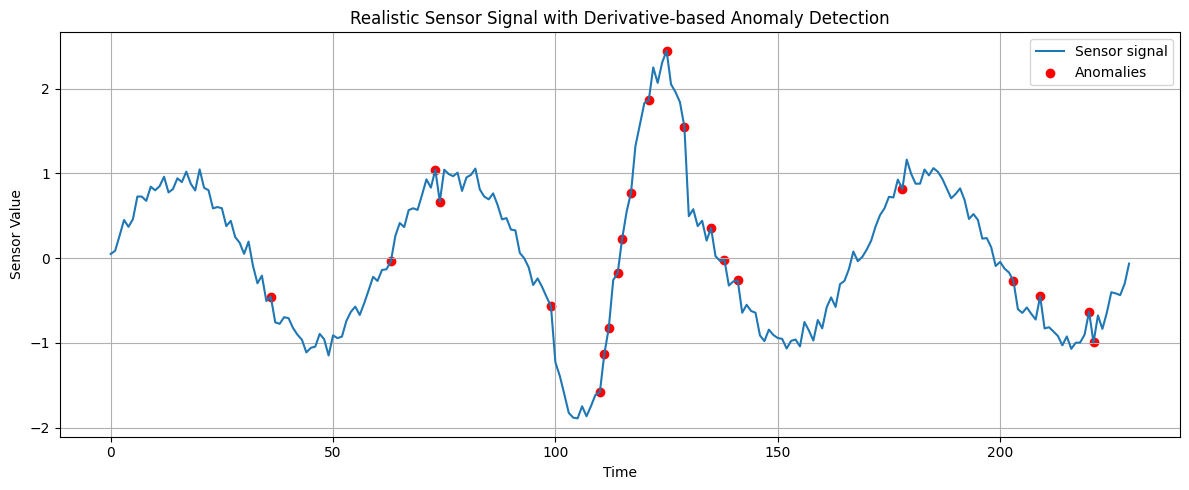
※ 변화량(기울기)을 감시하면 정상 범위 안의 급격한 변화도 잡을 수 있음
3. Moving Average + Change Point Detection
- 기법: 일정 구간의 평균/분산과 현재 값을 비교 → 급변 시점 감지
- 도구: ruptures, changefinder, Bayesian Change Point
import numpy as np
import ruptures as rpt
import matplotlib.pyplot as plt


np.random.seed(42)

n1, n2, n3 = 150, 100, 150
t1 = np.linspace(0, 6*np.pi, n1)
t2 = np.linspace(0, 6*np.pi, n2)
t3 = np.linspace(0, 6*np.pi, n3)
sig1 = np.sin(t1) + np.random.normal(0, 0.1, n1)
sig2 = 2*np.sin(t2 * 1.5) + 0.5 + np.random.normal(0, 0.1, n2)
sig3 = 0.5*np.sin(t3 * 0.5) - 0.3 + np.random.normal(0, 0.1, n3)
signal = np.concatenate([sig1, sig2, sig3])

# Change Point Detection
model = "rbf"  # 비선형 시그널에 적합
algo = rpt.Pelt(model=model).fit(signal)
result = algo.predict(pen=10)

# 시각화
rpt.display(signal, result)
plt.title("Ruptures - Realistic Change Point Detection (Sinusoidal)")
plt.xlabel("Time")
plt.ylabel("Sensor Value")
plt.show()

② 이동 평균(Moving Average) 기반의 간단한 이상치 탐지(Anomaly Detection)
import numpy as np
import matplotlib.pyplot as plt


np.random.seed(42)
n1, n2, n3 = 150, 50, 150
t1 = np.linspace(0, 4*np.pi, n1)
t2 = np.linspace(0, 2*np.pi, n2)
t3 = np.linspace(0, 4*np.pi, n3)
sig1 = np.sin(t1) + np.random.normal(0, 0.1, n1)
sig2 = 2*np.sin(t2) + 1 + np.random.normal(0, 0.1, n2)
sig3 = np.sin(t3) + np.random.normal(0, 0.1, n3)
data = np.concatenate([sig1, sig2, sig3])

# 이동 평균
window = 15
moving_avg = np.convolve(data, np.ones(window)/window, mode='same')

# 변화량 (편차)
diff = np.abs(data - moving_avg)
threshold = 0.6

# 이상 지점
anomalies = np.where(diff > threshold)[0]

# 시각화
plt.figure(figsize=(12, 5))
plt.plot(data, label="Signal")
plt.plot(moving_avg, label="Moving Average", linestyle='--')
plt.scatter(anomalies, data[anomalies], color='red', label="Anomalies")
plt.title("Moving Average-based Anomaly Detection (Realistic Sensor Signal)")
plt.xlabel("Time")
plt.ylabel("Sensor Value")
plt.legend()
plt.grid(True)
plt.tight_layout()
plt.show()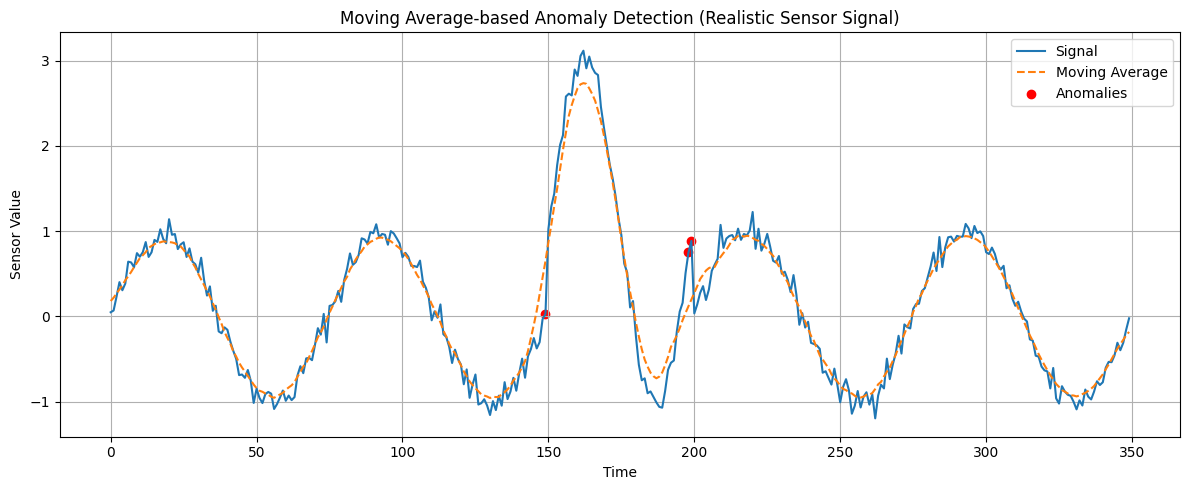
③ ChangeFinder 알고리즘을 사용한 이상 탐지 / 변화 탐지
import changefinder
import numpy as np
import matplotlib.pyplot as plt

np.random.seed(42)
n1, n2, n3 = 150, 50, 150
t1 = np.linspace(0, 4*np.pi, n1)
t2 = np.linspace(0, 2*np.pi, n2)
t3 = np.linspace(0, 4*np.pi, n3)
sig1 = np.sin(t1) + np.random.normal(0, 0.1, n1)
sig2 = 2*np.sin(t2 * 1.2) + 1 + np.random.normal(0, 0.1, n2)
sig3 = np.sin(t3) + np.random.normal(0, 0.1, n3)
data = np.concatenate([sig1, sig2, sig3])

# ChangeFinder 초기화
cf = changefinder.ChangeFinder(r=0.01, order=1, smooth=5)
scores = [cf.update(d) for d in data]

# 시각화
plt.figure(figsize=(12, 5))
plt.plot(data, label="Sensor Signal")
plt.plot(scores, label="ChangeFinder Score", color='orange')
plt.axvline(len(sig1), color='gray', linestyle='--', label='Change Start')
plt.axvline(len(sig1)+len(sig2), color='gray', linestyle='--', label='Change End')
plt.title("ChangeFinder - Realistic Change Detection")
plt.xlabel("Time")
plt.ylabel("Value / Score")
plt.legend()
plt.grid(True)
plt.tight_layout()
plt.show()
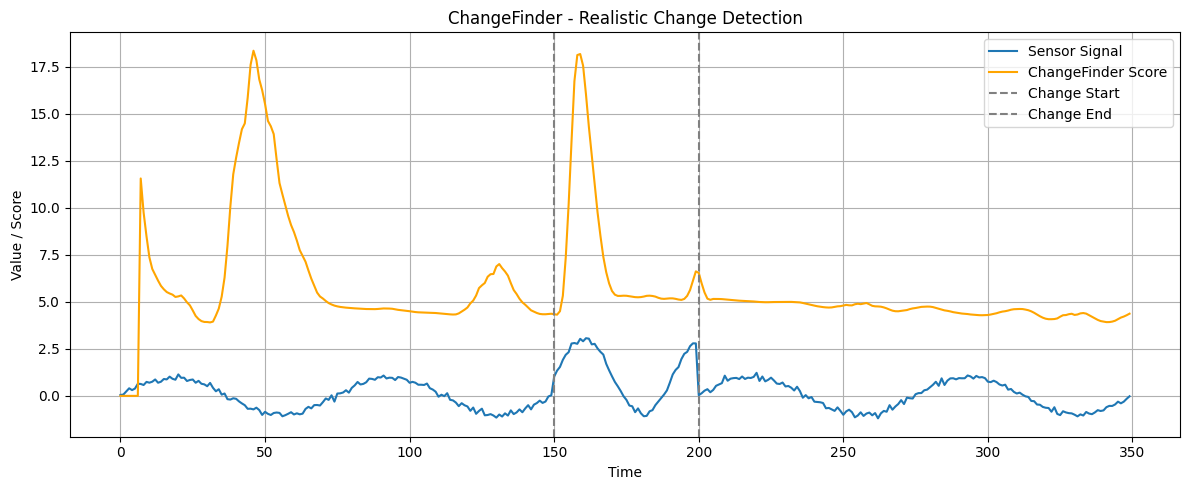
④ CUSUM (Cumulative Sum Control Chart) : 알고리즘을 이용한 변화 탐지 (Change Detection)
CUSUM은 통계적 공정 관리(SPC)에서도 많이 쓰이며, 평균이 갑자기 변하는 시점을 빠르게 포착할 수 있는 강력한 방법
import numpy as np
import matplotlib.pyplot as plt


np.random.seed(42)
n = 400
t = np.linspace(0, 8*np.pi, n)
data = np.sin(t) + np.random.normal(0, 0.2, n)
anomaly_indices = np.random.choice(range(50, 350), size=5, replace=False)
data[anomaly_indices] += np.random.choice([3, -3, 4, -4], size=5)

# CUSUM 설정
target_mean = np.mean(data[:50])  # 안정된 초기 구간 기준
k = 0.2
h = 2.5

cusum_pos = [0]
cusum_neg = [0]
anomalies = []

for i in range(1, len(data)):
    s_pos = max(0, cusum_pos[-1] + data[i] - target_mean - k)
    s_neg = max(0, cusum_neg[-1] - data[i] + target_mean - k)
    cusum_pos.append(s_pos)
    cusum_neg.append(s_neg)
    if s_pos > h or s_neg > h:
        anomalies.append(i)
        # 이상치 감지 후 바로 리셋하면 뒤에 끌림 방지 가능
        cusum_pos[-1] = 0
        cusum_neg[-1] = 0

# 시각화
plt.figure(figsize=(12, 5))
plt.plot(data, label="Sensor Signal")
plt.scatter(anomalies, data[anomalies], color="red", label="CUSUM Detected")
plt.scatter(anomaly_indices, data[anomaly_indices], color="black", marker='x', label="True Anomaly")
plt.title("🎯 CUSUM - Sparse Point Anomaly Detection")
plt.xlabel("Time")
plt.ylabel("Sensor Value")
plt.grid(True)
plt.legend()
plt.tight_layout()
plt.show()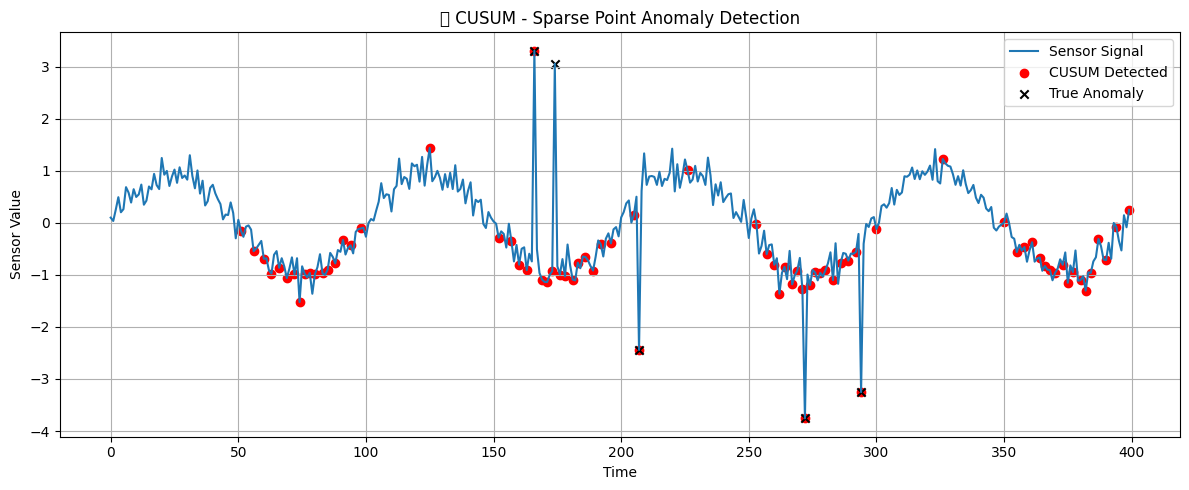
⑤ Bayesian Online Change Point Detection (BOCPD) : 알고리즘을 사용하여 시계열 데이터에서 변화점(분포가 바뀌는 지점) 을 실시간으로 탐지 BOCPD는 변화가 일어날 확률을 베이지안적으로 추론하며, 새로운 관측마다 변화 가능성을 업데이트하여 실시간으로 변화점을 탐지하는 강력한 알고리즘
%matplotlib inline
import numpy as np
np.random.seed(555)
import matplotlib.pyplot as plt
import bocd

#시계열 생성
t1 = np.linspace(0, 4*np.pi, 300)
t2 = np.linspace(0, 6, 300)
t3 = np.linspace(0, 4*np.pi, 300)
t4 = np.linspace(0, 4*np.pi, 300)

sig1 = np.sin(t1) + np.random.normal(0, 0.1, 300)
sig2 = 0.3 * t2 + np.random.normal(0, 0.1, 300)  # 점진적 증가
sig3 = np.sin(t3) + np.random.normal(0, 0.1, 300)
sig4 = 2 * np.sin(t4) + np.random.normal(0, 0.1, 300)  # 진폭 증가

# 전체 시계열
test_signal = np.concatenate([sig1, sig2, sig3, sig4])

# 시각화 - 입력 시그널
plt.figure(figsize=(12, 4))
plt.plot(test_signal)
plt.title("🔍 Input Sensor Signal")
plt.grid(True)
plt.show()

# BOCPD 초기화
bc = bocd.BayesianOnlineChangePointDetection(
    bocd.ConstantHazard(300),
    bocd.StudentT(mu=0, kappa=1, alpha=1, beta=1)
)

# 온라인 업데이트
rt_mle = np.empty(test_signal.shape)
for i, d in enumerate(test_signal):
    bc.update(d)
    rt_mle[i] = bc.rt

# 시각화 - 결과
plt.figure(figsize=(12, 5))
plt.plot(test_signal, alpha=0.5, label="Sensor Signal")
index_changes = np.where(np.diff(rt_mle) < 0)[0]
plt.scatter(index_changes, test_signal[index_changes], c='green', label="Detected Change Point")
plt.title("🧠 BOCPD - Realistic Change Detection")
plt.xlabel("Time")
plt.ylabel("Value")
plt.legend()
plt.grid(True)
plt.tight_layout()
plt.show()

⑥ Variance-based Rule
Variance-based Rule은 일정한 기간(슬라이딩 윈도우 또는 구간) 동안의 분산(혹은 표준편차) 을 계산하고,
그 분산이 사전에 설정한 임계값(threshold)을 초과하면,
“여기서 뭔가 변화가 생겼다(또는 이상하다)”
라고 판단하는 방식입니다.
import numpy as np
import matplotlib.pyplot as plt

np.random.seed(42)
length = 300
data = np.random.normal(10, 0.2, length)
anomaly_ranges = []
for _ in range(4):
    start = np.random.randint(50, 250)
    end = start + np.random.randint(5, 15)
    anomaly_ranges.append((start, end))
    data[start:end] = np.random.normal(10, 1.0, end - start)

# 이동 분산 계산
window = 20
variances = [np.var(data[i-window:i]) if i >= window else 0 for i in range(len(data))]

# 임계값 기준 이상 감지
threshold = 0.3
anomalies = np.where(np.array(variances) > threshold)[0]

# 시각화
plt.figure(figsize=(12, 5))
plt.plot(data, label="Sensor Signal")
plt.plot(variances, label="Rolling Variance", color='orange')
plt.scatter(anomalies, data[anomalies], color='red', label="Detected Anomalies")
for s, e in anomaly_ranges:
    plt.axvspan(s, e, color='gray', alpha=0.2, label="Injected Variance ↑")
plt.title("🎯 Variance-based Detection (Subtle, Sparse Anomalies)")
plt.xlabel("Time")
plt.ylabel("Value")
plt.legend(loc='upper right')
plt.grid(True)
plt.tight_layout()
plt.show()
📌 왜 분산을 기준으로 삼는가?
- 정상 구간은 일반적으로 분산이 작고 일정합니다.
- 이상 구간은 평균이 바뀌거나, 급격한 값의 진동이 생기며 분산이 커집니다.
- 따라서 분산이 갑자기 튀는 지점을 이상 또는 변화점으로 탐지할 수 있습니다
⑦ Guassian Tail Probability : 확률은 곧 "이 값이 정상 구간 밖에 있을 가능성" 이며,
- 이상치 탐지: 꼬리 확률이 매우 작으면 "이 값은 정상 분포에서 거의 안 나오는 값 → 이상"
- p-value 계산: 통계 검정에서 유의확률(p-value)을 계산할 때도 tail probability 사용
- 확률적 스코어링: 확률 기반 이상 탐지에 사용
- 일종의 이상치(outlier) 점수로 활용할 수 있어요.
- 정규분포(Gaussian distribution) 를 따르는 데이터에서,
- 평균으로부터 특정 거리 이상 떨어진 값이 나올 확률
import numpy as np
import matplotlib.pyplot as plt
from scipy.stats import norm

x = np.linspace(-5, 5, 1000)
y = norm.pdf(x, 0, 1)

plt.plot(x, y, label='Gaussian PDF')
plt.fill_between(x, y, where=(x > 2), color='red', alpha=0.3, label='Right Tail (Z > 2)')
plt.fill_between(x, y, where=(x < -2), color='blue', alpha=0.3, label='Left Tail (Z < -2)')
plt.title("Gaussian Tail Probability")
plt.legend()
plt.grid(True)
plt.show()
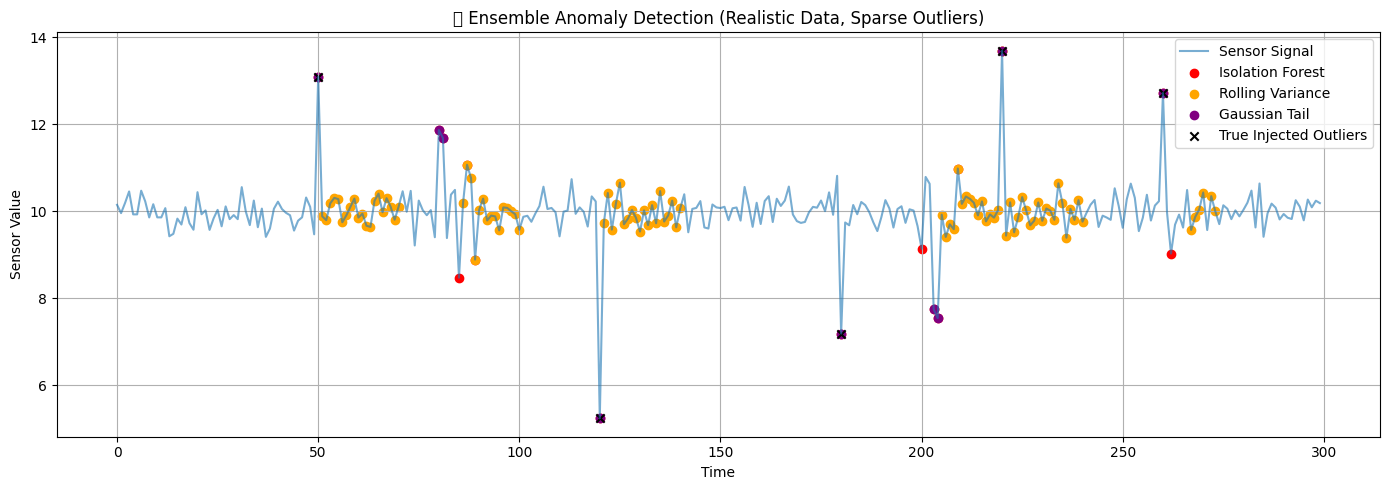
종합적 이상탐지 코드예시
import numpy as np
import matplotlib.pyplot as plt
from sklearn.ensemble import IsolationForest
from scipy.stats import norm

# ===========================
# 1. 자연스러운 시계열 데이터 생성
# ===========================
np.random.seed(42)
n = 300
data = np.random.normal(10, 0.3, n)
outlier_indices = [50, 120, 180, 220, 260]
data[outlier_indices] += np.random.choice([3, -3, 5, -5], size=len(outlier_indices))
for start in [80, 200]:
    end = start + 10
    data[start:end] = np.random.normal(10, 1.0, end - start)

# ===========================
# 2. Isolation Forest
# ===========================
iso = IsolationForest(contamination=0.05, random_state=42)
labels_iso = iso.fit_predict(data.reshape(-1, 1))
anomalies_iso = np.where(labels_iso == -1)[0]

# ===========================
# 3. Rolling Variance Rule
# ===========================
window = 20
rolling_var = np.array([
    np.var(data[i-window:i]) if i >= window else 0 for i in range(len(data))
])
var_threshold = 0.5
anomalies_var = np.where(rolling_var > var_threshold)[0]

# ===========================
# 4. Gaussian Tail (Z-score 기반)
# ===========================
mean = np.mean(data)
std = np.std(data)
z_scores = (data - mean) / std
tail_probs = 2 * (1 - norm.cdf(np.abs(z_scores)))
tail_threshold = 0.01
anomalies_tail = np.where(tail_probs < tail_threshold)[0]

# ===========================
# 5. 시각화
# ===========================
plt.figure(figsize=(14, 5))
plt.plot(data, label="Sensor Signal", alpha=0.6)
plt.scatter(anomalies_iso, data[anomalies_iso], color='red', label="Isolation Forest")
plt.scatter(anomalies_var, data[anomalies_var], color='orange', label="Rolling Variance")
plt.scatter(anomalies_tail, data[anomalies_tail], color='purple', label="Gaussian Tail")
plt.scatter(outlier_indices, data[outlier_indices], color='black', marker='x', label="True Injected Outliers")
plt.title("✅ Ensemble Anomaly Detection (Realistic Data, Sparse Outliers)")
plt.xlabel("Time")
plt.ylabel("Sensor Value")
plt.legend()
plt.grid(True)
plt.tight_layout()
plt.show()